
HTB Active Writeup
Windows Active Directory, smbmap, Impacket, kerberoasting, cracking service ticket hashes
Table of Contents
Summary
Reconnaissance
Initial Access
Privilege Escalation to a User Account
Credential Access
Privilege Escalation/Lateral Movement to Domain Admin
Summary
Note: I was studying this box over a few days and thus the IP address for the box changes slightly, though they should all begin with 10.129.
HackTheBox Active is a fairly easy box but still goes over a topic that can be complex which is Windows Active Directory. By doing this box, I was first able to get more comfortable doing recon on Windows environments (more specifically enumerating SMB). During the privilege escalation part, I learned the basics of how Active Directory works, along with one way of exploiting its functionality. Doing so, I got experience with Impacket and a couple modules that are included within it.
The key components to exploiting this box are as follows:
First realizing that SMB is open on ports 139/445
Finding out the
Replicationshare can be accessed anonymously, allowing to view the contents without any credentialsObtaining the
Groups.xmlfile which contains an AES encrypted passwordDecrypting the password allows to login with a valid set of credentials
Finding out that a service ticket can be obtained due to having a valid set of credentials
Obtaining service ticket gets a hash that can be cracked offline using John the Ripper
Once the hash is cracked, using Impacket’s
wmiexec.pyorpsexec.pycan be used to access the system as Administrator
Reconnaissance
I started off by doing an nmap scan nmap -sC -sV -oA active. 10.129.64.156 which will use default scripts, probe for service information/version, and will save the results into active.nmap. The scan resulted in the following:

Several things were noted about this nmap scan:
Kerberos is running as a service
Microsoft Active Directory (AD) is a part of this box
Port 139/445 is open (SMB)
Domain is
active.htb
SMB Enumeration
Server Message Block (SMB) is a protocol used in network file sharing that allows applications on a computer or server to access files/services on the network environment. According to this Microsoft Doc, “Using the SMB protocol, an application (or the user of an application) can access files or other resources at a remote server. This allows applications to read, create, and update files on the remote server. SMB can also communicate with any server program that is set up to receive an SMB client request.”
In summary, SMB is used to share files and other resources between a client and a computer.
The nmap scan from above show that SMB is exposed on ports 139 and 445. Enumerating SMB could provide us information that could lead into getting access to files on the system. For this, I used smbmap which is already installed by default on Kali Linux. To first find a list of shares along with checking if anonymous access (no username/password required) is allowed, I did the command smbmap -H 10.129.64.156 -d active.htb. The -H identifies the IP address of the machine and -d would be the domain name, in this case I got the domain name from the original nmap scan active.htb. Below is the results from running the smbmap command.

The smbmap scan showed that the Replication share could be accessed without providing a username and password.
Initial Access
To access Replication the tool I used was smbclient. The syntax of the machine and share to access is \\IP\share. But since in bash the backslash character is used to preserve the literal value of the following character (an escape character), when typing the machine/share name in terminal it would need to be \\\\IP\\share. Thus the command I used to access the Replication share on the IP address is smbclient \\\\10.129.65.119\\Replication. Afterwards, a prompt pops up asking for a password in which case I left blank (just pressed the enter button) and it says Anonymous login successful! Note that once a shell is presented, the help command can be used to show a list of commands that can be utilized.

Privilege Escalation into a User Account
Looking around, I came across the Groups.xml file located under \active.htb\Policies\{31B2F340–016D-11D2–945F-00C04FB984F9}\MACHINE\Preferences\Groups\.

The following articles by adsecurity goes over a bit about this Groups.xml file and what it is used for:
The two articles mention that once a new GPP (Group Policy Preference) is created, a new .xml file is created that is associated with the new GPP. This .xml file contains all the relevant configuration information that is needed and can include an AES-256 encrypted password cpassword. Here it is in the Groups.xml file:

According to the the later adsecurity article mentioned above, “Except at some point prior to 2012, Microsoft published the AES encryption key (shared secret) on MSDN which can be used to decrypt the password. Since authenticated users (any domain user or users in a trusted domain) have read access to SYSVOL, anyone in the domain can search the SYSVOL share for XML files containing “cpassword” which is the value that contains the AES encrypted password.” This means that since Microsoft published the AES encryption key, it is possible to decrypt the password taken from the Groups.xml file. The two fields from the Groups.xml file that are of interest are:
name=”active.htb\SVC_TGS”
cpassword=”edBSHOwhZLTjt/QS9FeIcJ83mjWA98gw9guKOhJOdcqh+ZGMeXOsQbCpZ3xUjTLfCuNH8pG5aSVYdYw/NglVmQ”
When looking up tools to decrypt GPP passwords, I came across this tool named gpp-decrypt which is installed by default on Kali Linux. The syntax for it is gpp-decrypt cpassword.

The credentials to the user account that were acquired are as follows:
Username: SVC_TGS
Password: GPPstillStandingStrong2k18
Getting the User Flag
Using the newly acquired credentials, I decided to check which smb shares are now accessible to me. I used the same tool as before, smbmap, but this time I supplied the username and password by doing the command smbmap -u 'SVC_TGS' -p 'GPPstillStandingStrong2k18' -d active.htb -H 10.129.65.119.

Compared to running smbmap as anonymous user (supplying no credentials), the NETLOGON, SYSVOL, and the Users shares are all accessible. The NETLOGON didn’t have anything in it, and the SYSVOL seemed to be a copy of Replication. However the Users share had new stuff in it.
Looking into the SVC_TGS directory (the user we’re currently signed in as), and into the Desktop directory, the user flag was found!

Credential Access
Since a user account was acquired, something that could be attempted is Kerberoasting. The following two segments will first contain some high level information about Kerberos authentication as it is import to learn what it is before exploiting how it works. Then the next segment would go over Kerberoasting.
What is Kerberos and How Does it Work?
Kerberos is the default authentication method used by Microsoft Windows which mainly utilizes tickets. Authentication via Kerberos and Active Directory is essentially what allows you to sign in using the same set of credentials on different computers and services throughout the same environment (ex: a school, company, workplace, etc). The actual authorization and key distribution happens at the Key Distribution Center (KDC) which is within the Domain Controller (DC) of an Active Directory environment.
The following describes the Kerberos authorization process and then the process of accessing a service:
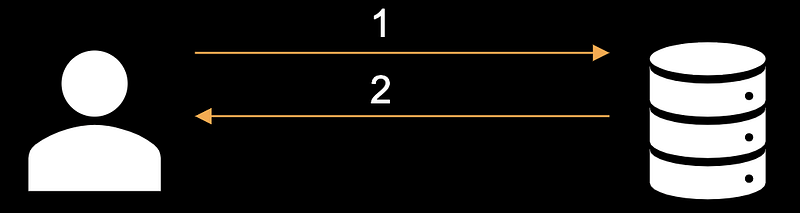
The user provides their credentials which go to the Key Distribution Center (KDC), requesting a Ticket Granting Ticket (TGT)
The KDC then checks if the username and password that were supplied are valid, and if so a TGT is granted (allowing the user to sign onto the environment)
The user requests access to the service by first going to the KDC and presenting the TGT that was given during login
The Key Distribution Center then verifies if the TGT is valid, and if so, the KDC gives user a Ticket Granting Service (TGS) which contain a hashed password
The TGS ticket that was granted to the user is then presented to the service that the user wants access to
The service then authenticates the user by checking if the hashed password in the TGS ticket is valid, if so the user is granted access to the service

What is Kerberoasting and How Does it Work?
The above steps go over how a user accesses a service. One thing to note is that the Ticket Granting Service (TGS) ticket that is given on step 4 contains a hashed password. The KDC/DC is not responsible for authenticating the user into the service, the service itself is responsible. But all that is needed to request a TGS is a valid TGT ticket.
Thus by having a valid TGT ticket (a valid set of credentials), one method to gather more credentials is by requesting TGS tickets — targeting AD user accounts with servicePrincipalName (SPN) values (indicating that they are service accounts). These TGS tickets contain hashed passwords that can be taken offline to be cracked.
Using Impacket to do Kerberoasting
The Impacket tool kit includes a module GetUserSPNs.py that will perform the Kerberoast attack. The syntax is GetUserSPNs.py -request -dc-ip IP domain/username:password. Without the -request flag it will only output the accounts that are possible to get a hashed password for, the -request flag will output it in a format that can be cracked.
Thus the command I used was GetUserSPNs.py -request -dc-ip 10.129.65.119 active.htb/SVC_TGS:GPPstillStandingStrong2k18. The results are as follows:

A hash was captured that belongs to the account Administrator! I save the hash into a file called hash.txt then I use John the Ripper to crack it. I simply just provide John the Ripper the wordlist and the file that contains the hash, making the final the command: sudo john hash.txt --wordlist=/usr/share/wordlists/rockyou.txt.

The password that was cracked is Ticketmaster1968.
Privilege Escalation/Lateral Movement to Domain Admin
From cracking the password, we have the credentials:
Username: Administrator
Password: Ticketmaster1968
The Impacket toolkit contains a couple modules that we can use these credentials to get access into the system: wmiexec.py and psexec.py. For this example, I used psexec.py, though the syntax for wmiexec.py is the same. You simply just need to provide the username and IP address you want to sign onto as: psexec.py Administrator@10.129.65.119.

Upon logging in, doing a whoami verifies that I am logged into as nt authority\system. Looking around, the root.txt flag can be found under C:\Users\Administrator\Desktop!

Last updated