
HTB Granny Writeup
Granny is a HackTheBox challenge that has different methods to achieve root access. The main method of exploiting this system is abusing a commonly seen Webdav upload vulnerability. To complete this box, basic enumeration of services and Windows is all that’s needed. Doing this box will teach how to abuse Webdav upload vulnerabilities, and basic Windows privilege escalation techniques.
Enumeration
First starting of with a basic nmap scan: nmap -sC -sV -oA granny 10.10.10.95. This will output the result and save it as granny.nmap. Here’s what it shows us:

One of the first things we see is that port 80 is open, meaning we are looking at a web server. Reading more into the scan results, we are dealing with a Microsoft IIS webserver so this is a windows based machine.
Checking out the main webpage:

We see there’s a page that is under construction.
Next, I run a gobuster scan on the webpage:
Visiting http://10.10.10.15/images and http://10.10.10.15/_private show empty directories and thus we got nothing…
Next thing I notice from the nmap scan was webdav. I never heard of webdav prior to this box, so doing some research on webdav I find out from this wiki page: Web Distributed Authoring and Versioning (WebDAV) is an extension of the Hypertext Transfer Protocol (HTTP) that allows clients to perform remote Web content authoring operations. The WebDAV1 protocol provides a framework for users to create, change and move documents on a server. Doing some further research on webdav enumeration, I find out about davtest from the kali linux website.
Doing a davtest scan:
So from the davtest results, we see that we can upload a .txt file. A previous HackTheBox challenge I remember deals with IIS and it deals with the webserver executing ASPX files. Checking out the response headers by firefox dev tools I see the following:

The Powered by: ASP.NET means that it executes .asp files (asp is used mainly for older, early 2000s OS), though we can’t upload asp files (shown by the davtest PUT results. Though going back to the nmap enumeration I noticed that under Public options it lists MOV which means we can rename it to an .asp file and get it to execute. This should create us a reverse shell.
Exploitation
To create the payload, I use msfvenom. From this cheatsheet and knowing the information about the box gathered by the enumeration techniques, I use this payload under windows meterpreter reverse_tcp:
Though instead of outputting the format as an exe and saving it as shell.exe we need to replace it with .asp. (msfvenom allows you to output as text and you can confirm by doing msfvenom -lf which lists the formats). This is the msfvenom command I do:
Now I need to upload the file and reading through curl’s manpage you can pair it with PUT and MOVE.
PUTting the text file thanks to this stackoverflow page
Now, MOVing the text file to shell.asp (essentially renaming it from shell.txt, to shell.asp) thanks to this website
Now I need to create a metasploit listener (note it’s important to use the same payload and port used in the msfvenom step):
And now going to 10.10.10.15/shell.asp it gives me a meterpreter shell!
You can access the meterpreter session by doing sessions -i 1. When I do and check who I am, I am only nt authority\ network service which is not admin.

I went around the box and found some Administrator folder under C:\Documents and Settings and it turns out I cannot access it.

Privesc
Next I turn to a local exploit suggester to privesc:
From all of them, the one’s appear to work are:
Now I go into the session and transfer into a process that I currently own (owned by nt authority\system service).

Picking the first off the list from above, I try out the exploit windows/local/ms14_058_track_popup_menu. (not forgetting to set my LHOST to my own IP).
(I played around different sessions and had to open/close sessions. The current session (4) was fresh after refreshing the box and getting a reverse tcp shell).
Now that we are NT AUTHORITY\SYSTEM, this confirms we are admin!
Root/User Flags
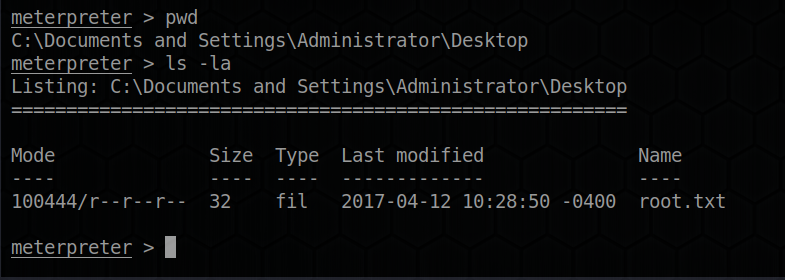
Going back to those directories found earlier in C:\Documents and Settings\ we see there are two users Administrator and Lakis. In the Lakis\Desktop we get the user.txt flag:

Conversely in the Administrator\Desktop:
Sources
Last updated