
WannaCry (in progress)
Reverse Engineering Malware: WannaCry
sha256: 24d004a104d4d54034dbcffc2a4b19a11f39008a575aa614ea04703480b1022c


Results of running the WannaCry ransomware: encrypted files, and multiple ransomware notes
Things I learned
How the default Windows entry code looks like
What the
Decompiler Parameter IDand theWindowsPE x86 Propogate External Parametersoptions does in Ghidra
Resources/Notes
https://www.youtube.com/watch?v=Sv8yu12y5zM
I’m currently learning so I’ll be following this 3-part video series, so most of my analysis/notes will stem from this video
Setting up Ghidra
Created new directory for the project
Set up the project: Open Ghidra >
New Project>Non-Shared Project> selected the new directory I created > named projectwannacry_projImport the executable:
File>Import File> select the WannaCry executableLoad WannaCry into Ghidra: Drag the executable that was imported in the previous step into the dissassembler icon (green dragon icon)
In the Analysis Options window that pops up, checkmark both the
Decompiler Parameter IDandWindowsPE x86 Propogate External Parameters, doing research on what both those does:Decompiler Parameter IDattempts to decompile it into C (a higher level language) to make it easier to do manual analysis of the pseudocodeWindowsPE x86 Propogate External Parameterswill put comments that show the parameter names of the Windows API calls
Click
Analyze
Reverse Engineering in Ghidra
The “Entry” Function

This is the default entry code for windows executables, on the bottom we can see the call into the win main function as FUN_00408140():

In Ghidra, we can edit the function to include the proper parameters from the Windows documentation website (https://learn.microsoft.com/en-us/windows/win32/api/winbase/nf-winbase-winmain) by right clicking the function > Edit Function Signature and copy/pasting what was seen from the Microsoft documentation website.
This is what I replaced it with: int WinMain(HINSTANCE hInst, HINSTANCE hInstPrev, PSTR cmdline, int cmdshow)
The WinMain() Function
One of the first things that I saw when entering the WinMain function was an interesting URL string:

I changed the variable type to be a char* variable.
Following, we see the program enter a for loop that starts at 14, I renamed the decrementing integer variable as i. For every loop, it copies 4 bytes into the interesting URL string from above into what I renamed to temp_url.
In addition, before the for loo, wep can see temp_url was set from a stack buffer which I renamed temp_url_buffer.
The next few lines of interest contain Microsft API calls: InternetOpenA and InternetOpenUrlA:
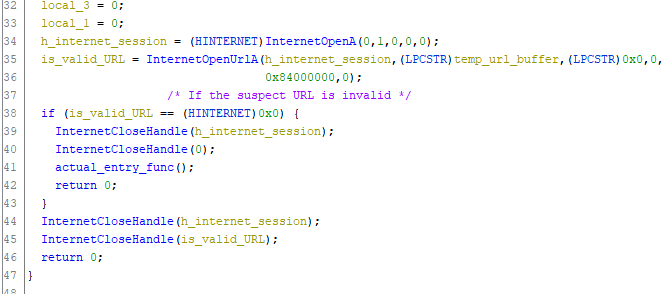
I changed the InternetOpenUrlA function prototype to what it says in the Microsoft documentation website. I had to create a new TypeDef in by rightclicking wannacry on the bottom left window for the HINTERNET handle. (video had the data type as void *)
According to the Microsoft documentation, InternetOpenA is used to initialize an application’s use of the WinINet functoins. Meanwhile, InternetOpenUrlA “opens a resource specificed by a complete FTP or HTTP URL.”
InternetOpenUrlA returns a valid handle to the URL if the connection is successfully established, it will return NULL if the connection fails.
So if the URL is not valid, it enters the function that I renamed to actual_entry_func().
Last updated