
Flare-On 8 Challenge 2: Known
To download these Flare-On challenges visit http://flare-on.com/files/Flare-On8_Challenges.zip
Things I Learned from Challenge
Importance of being able to rename functions and variables used in the pseudocode view
How to research and understsand the Windows API functions/calls and reading through the Microsoft Docs website
Learning how arrays/indexing looks like in the pseudocode view
How to round to the nearest byte in python (mod 256)
The Situation
The situation prompt is that a company needs your help with a ransomware incident that encrypted some critical files.
For this challenge you are given:
UnlockYourFiles.exeFileswhich is a directory that contains all the encrypted files
Beginning
Running the given executable shows a ransomware-like message, saying that files have been encrypted and the only way to unlock the files is to enter the unique private key.

Entering a key such as test decrypts all the files with that key, but since it is not the correct key the files still show up with garbage values.
At the bottom of the message (above where we enter a key) it shows what looks like a Base64 message (has = at the end). Putting it in CyberChef shows the message:

This is a hint that references some of the operations the decrypting executable does.
Reversing the Executable with Ghidra
Note: In the screenshots, the function and variable names are what I renamed them to be. Opening the executable fresh within Ghidra will show different names. This is for the ease of explaining in the writeup.
First starting off with the starting function that I renamed to main:

How this function works:
Prints out all the text that we see when running the executable
Takes the user input (the key)
Calls the next function, which I renamed to
find_files. It passes in the key the user inputs
The find_files function:

How this function works:
Looks for the
Filesdirectory, and if it does not exist, it will exit and print an error messageIf the directory
Filesexists, it loops for every encrypted file inside that directory. In each loop, it passes the encrypted filename, and the inputted key (whatever the user inputted) to the functiondecrypt_with_keyIn addition, it counts how many files end with
.encryptedand prints it out at the end
The decrypt_with_key function:


How this function works:
First checks if the file exists, if it does not, it will exit and print an error message
It then enters a while loop which goes through the contents of the file, passing it through the helper function
decrypt_filewhich does the decrypting workAs the contents are being decrypted, it makes a file without the
.encryptedextension with the decrypted contents (e.g. if the file name wastest.txt.encryptedit will decrypt it and write it totest.txt)
The decrypt_file function is what is the key in solving this challenge, it contains the algorithm on what is used to decrypt the files. Below is the pseudocode for that function:

For this portion, I thought it would be best to recreate this in python.
Things to note during the conversion (had to look at a writeup by 0xdf for a nudge on this portion)):
On line 11, where it says
(i + inputted_key)or(i + buffer), this means that it’s taking the i’th index, meaning it’s takinginputted_key[i]orbuffer[i]Need to convert int to byte (there’s a python function to do that for you)
on line 12, the end result is being cast to a singular byte, this means that you need to round to the lowest 8 bits which can be done with
mod 256
Below is what I converted the decrypt function to in python3, above it in the comments was the pseudocode for reference:
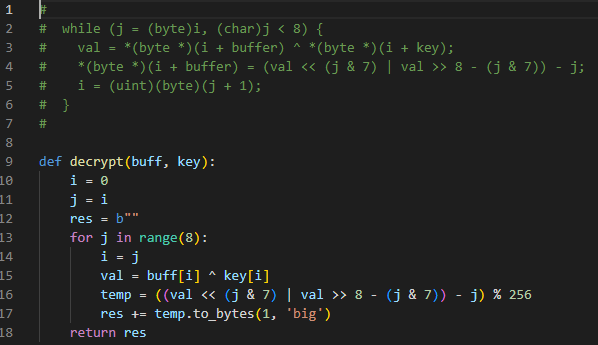
Once I had the decrypt function working and tested it to verify that it works, I wrote some more code to brute force the right key since we can guess some plaintext.
Within the Files folder, there’s a file named latin_alphabet.txt.encrypted which I can guess contains ABCDEFGHIJKLMNOPQRSTUVWXYZ. Since we have the encrypted string, and a plaintext string, we can brute force until we find the correct key. This means we’ll try every possible key value until the decrypt function spits out the plaintext string.
Finding the first few bytes in the latin_alphabet.txt.encrypted file using PowerShell and what ABCDEFGH is in bytes:


Wrote the first 8 bytes, along with the expected output (ABCDEFGH in bytes) in two separate variables. Then for each of the 8 indexes, it goes through all 256 possibilities until the expected output is given. Full code below:

Running it tells us the key is No1Trust. Running the UnlockYourFiles.exe and entering the key successfully decrypts the files.
Opening critical_data.txt gives the flag: You_Have_Awakened_Me_Too_Soon_EXE@flare-on.com

Last updated