
HTB Bashed Writeup
Bashed is an easy-medium level machine from HackTheBox. In this writeup I use dirbuster to look at directories and file names within the website. Knowledge of basic enumeration, and Linux systems should be known; by doing this machine, I learned how to create reverse shells, how to transfer files between an attacker’s/victim’s machine, and how webshells work.
Enumeration
Doing an nmap scan: nmap -Pn --script vuln 10.10.10.68 will show the following:

Checking out the website:

So on the front page there’s something that the author/creator put called phpbash. Apprently it helps with pentesting, clicking the arrow goes to another page where the author puts a link to a github: https://github.com/Arrexel/phpbash
So from the nmap scan, we see that there are some interesting directories listed on the website. We can do further scans and see more directories and files using Dirbuster. I used Dirbuster’s default wordlist directory-list-lowercase-2.3-small.txt. This wordlist can be found under /usr/share/dirbuster/wordlists/directory-list-2.3-medium.txt.
Dirbuster shows us some more interesting directories and files:
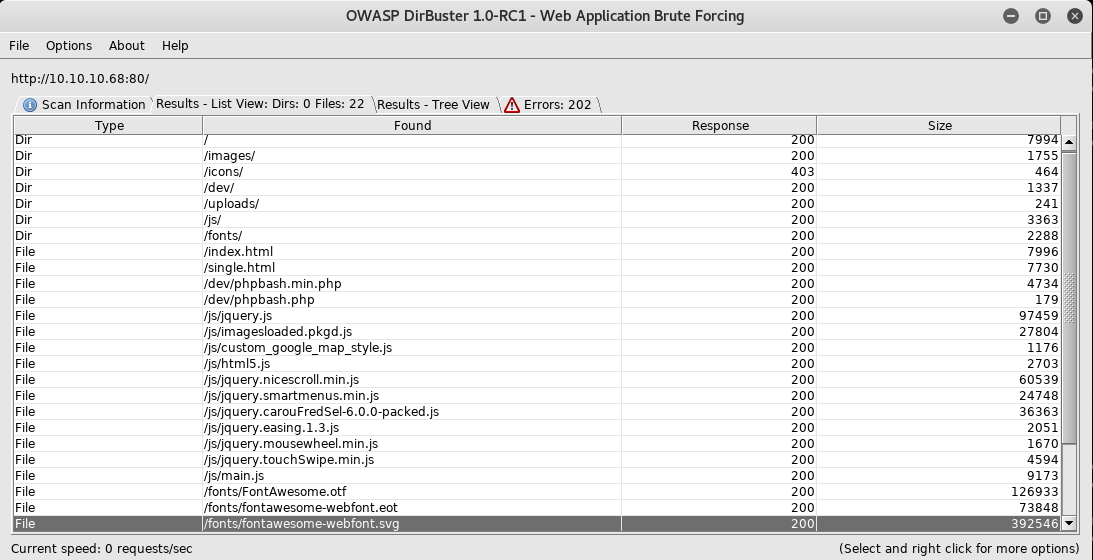
Poking around and seeing the different directories and files, I eventually come across phpbash (what the github like was about) and it seems like a shell within the website at 10.10.10.68/dev/phpbash.php. Doing a quick whoami says I’m www-data which I suppose means I have user level access within this website.
Shown below is a picture of the shell within the website:

Exploitation (and some more enumeration)
Upon discovering this shell and having user level access, I look around the box and see what files I have access to.
Getting the user flag
I eventually wander into /home/ and discover that there’s a couple users listed: arrexel and scriptmanager. Going into arrexel I see that there’s a user flag!
As I’m going through each page carefully (doing a full ls -la check) I discover that if you go up one directory (from the one where you started), and go into uploads, we have read, write, and execute permissions. Here’s a picture of what is shows:

Since we have write permissions, we can upload things into this directory and get an actual shell. My plan is:
Create php code for a reverse shell that will be ready to use on the target host (we will upload it to target host)
Use
python -m SimpleHTTPServer(it automatically uses port8000) to communicate with target hostUsing the simple http server, upload the php code
Run php code which will attempt to communicate with our local computer
Run
ncat -ncvlp 4444(this will listen on port 4444)
This should get us a shell. The steps are explained more in detail (with some pictures).
For the first step, I used pentestmonkey’s php code. You need to modify the php code to your IP and the port you’ll be using on your simple http server.
The second step is straight forward, I just ran python -m SimpleHTTPServer.
For the third step, we’d need to utilize wget which is a command to retrieve web content (like our SimpleHTTPServer), you’d also need to do it on the uploads directory on the website. You’d also need to give the direct link to the file you want to upload. Here’s a visualization:
 .
.
Assuming your wget command has the correct ip/port, the file should’ve been uploaded.
For the fourth step, we’d need to go directly to the page where the php code is stored (10.10.10.68/uploads/[name of code]) which leads to the fifth step of creating a listener on the port you put in the php file. (for example I put port 4444 on the code so to set up a listener, I’d do nc -nvlp 4444 on my local terminal.
If everything goes fine, you should get a response with a shell on your local terminal!
So to set up the shell better (and allow for potential escalation), I did python -c "import pty; pty.spawn('/bin/bash');".
Doing an ls -la check reveals something interesting toward the bottom, there’s a directory by someone named scriptmanager

Doing sudo -l reveals we can run things as scriptmanager!
Now we can do sudo -u scriptmanager /bin/bash to get the shell as scriptmanager and thus allowing us to easier run commands as scriptmanager.
Going into that interesting directory, scripts we see there are two files:

Looking at both, it seems that the python file writes to the text file which is owned by root… So even though we edit it as scriptmanager (and thus own it) it still becomes root.
Using pentestmonkey’s python reverse shell code and inserting it into the python code, when root runs that code again it will run the extra python code and we could potential gain a shell.
So similar to earlier, we edit the python file to include the reverse shell then we attempt to connect back to it using nc.
Here’s the python code with the extra code:
I use the same concept from earlier with the python SimpleHTTPServer to upload the new python file and after I set up the netcat listener: nc -nvlp 4444. About a minute later, root ran the code and we we’re able to get a root shell!
Looking around I eventually got the root flag!
Flags
User: /home/arrexel/user.txt
Root: /root/root.txt
Last updated